
Recently we updated our Pckgr Custom Application feature to support ZIP folders, which led to an interesting scenario: deploying a PowerShell App Deployment Toolkit (PSADT) packaged application inside another PSADT package. While it sounds complex and perhaps a bit ironic our Custom Application process with the right configuration handled it flawlessly.
The original ZIP application already utilized PSADT because multiple MSI installer files needed bundling. Since our Custom Application process inherently wraps installer files using PSADT, it meant PSADT would effectively initiate another PSADT deployment! Here’s how we assisted the customer to ensure smooth deployment:
- ZIP Upload:
- Directly uploaded their existing PSADT-packaged application as a ZIP folder.
- Main Installer Filename:
- Specified the main installer as
Deploy-Application.exe. This executable initiates the embedded PSADT deployment.
- Specified the main installer as
- Custom Install String:
- Utilized a PSADT-compatible command line:
-DeploymentType "Install" -DeployMode "Silent"
This ensures the installation runs smoothly, silently, and completely unattended.
- Utilized a PSADT-compatible command line:
- Automated Testing and Detection Rules:
- Our Custom Application process automatically verifies successful installation by running automated tests post-deployment.
- It dynamically generates appropriate detection rules based on the installed application, ensuring accuracy and reliability when deployed via Intune.
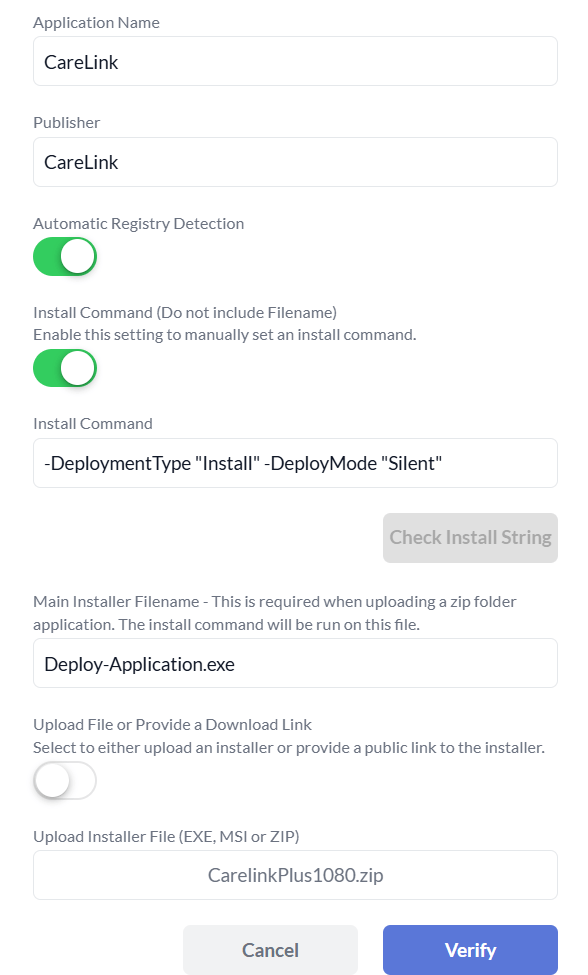
We were able to confirm that application was able to install successfully as shown here:

We then confirmed that deploying the package from Intune to a Windows device was successful.
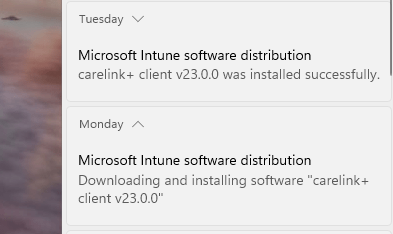
With this streamlined process, our clients can confidently deploy even the most complex applications.
 Pckgr Blog
Leave a comment