
After months of building (and rebuilding, and rebuilding again), we’re incredibly excited to announce a new product: the Pckgr Portal is officially live. Alongside Pckgr for Intune, which continues exactly as it always has, the Pckgr Portal is a brand new offering. A simple, affordable device management platform for teams that want a lightweight way to look after their Windows fleet.
Why We Built This
Managing a Windows fleet can get expensive and complicated fast. The big enterprise platforms are powerful, but they also assume enterprise budgets, dedicated admins, and the patience for deep configuration. For smaller shops, growing teams, and MSPs running a dozen different client environments, that’s often more than they need.
We built the Pckgr Portal to sit in the middle. Lightweight, affordable, and focused on the things you actually do day to day: getting apps onto devices, keeping Windows patched, and giving you a clear view of what’s happening across the fleet.
Pick an App, Click Assign, Done
The heart of the Pckgr Portal is the app catalogue. Over 700 applications, pre-built with PSADT (the PowerShell App Deployment Toolkit), already version-tracked and tested, already carrying the detection and requirement scripts. All written, all tested, all ready. You don’t package anything yourself. You browse, stamp a catalogue entry into your tenant, and assign it to a group. New versions flow through automatically after whatever delay you configure.
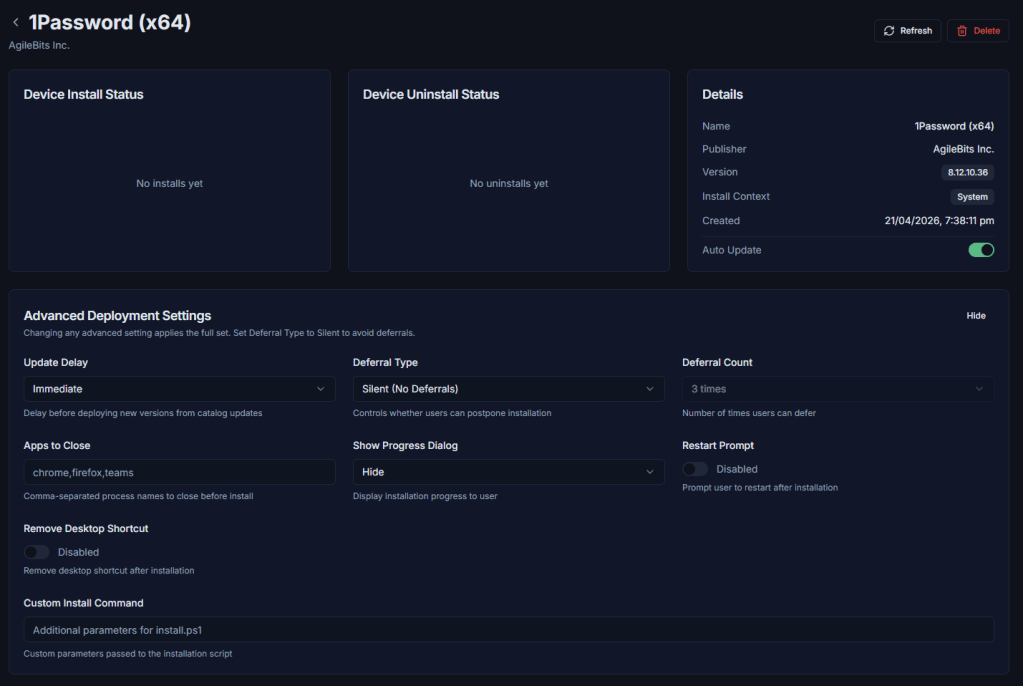
Every app you add in gets the full PSADT toolkit behind it. Defer prompts, install progress dialogs, restart prompts, running-app close behaviours, desktop and start-menu shortcut control, custom install commands. Configure it once per app and every device gets the same experience.
Four assignment intents give you fine-grained control over what the fleet does:
- Install keeps the app installed across the group.
- Uninstall removes it.
- Update Only keeps it current, but only on devices where it’s already installed.
- Available surfaces the app in the self-service portal for users to install on demand.
And when something does go wrong with an auto-update? Click rollback. Pckgr cancels any in-flight jobs, rewrites the package back to the previous version, and fans out Uninstall and Install jobs per device with ordering guaranteed. One click, whole fleet, every device accounted for. You can also preview the rollback blast radius before pulling the trigger, which is exactly what you want when a bad update starts rolling out.
If you have apps with prerequisites, you can wire up dependency chains so a prerequisite must succeed before the downstream install kicks off.
Smart Patch: One Button for Windows Updates
Building Windows Update rings the traditional way means assigning devices to pilot, fast, and broad rings by hand, remembering to balance them as the fleet grows, and hoping your deferral and deadline settings line up with reality.
Smart Patch turns that into a button.
Enable Smart Patch and we automatically distribute your fleet across three opinionated rings: Pilot at 5% of devices, Fast at 15%, and Broad at 80%. Assignment is stable, so devices stay in the ring they were originally placed in. New enrolments slot into whichever ring is lightest, so the distribution stays proportional as you grow. You can tweak the percentages, deferral days, deadlines, grace periods, active hours, and driver exclusions on any ring, or pin a specific device to a specific ring if it needs special treatment.
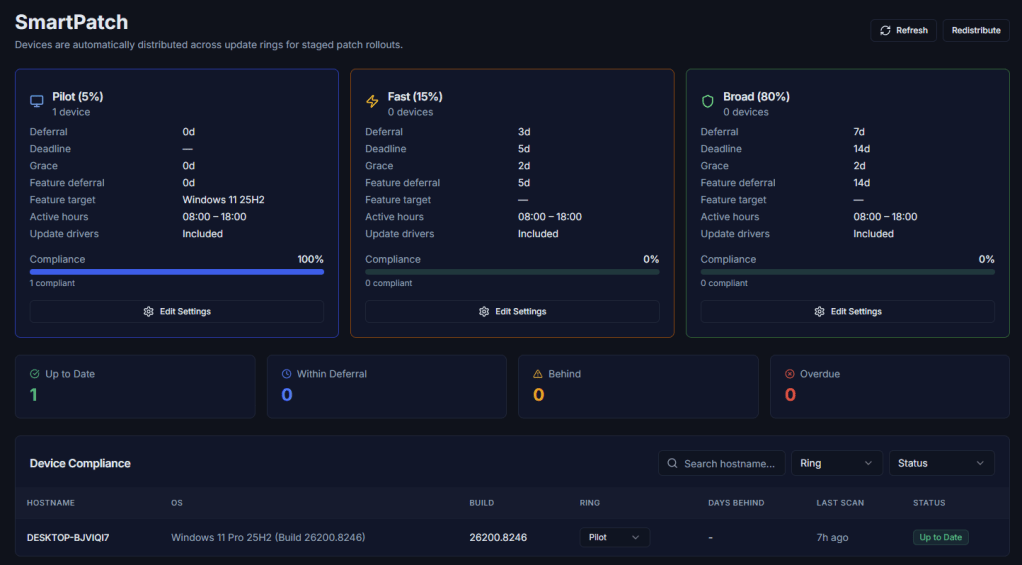
The portal also gives you a proper compliance view. Devices are classified into one of six states based on their OS build compared to the latest Microsoft baseline and their ring’s deferral window:
- Up to Date (on the latest baseline)
- Within Deferral (behind the baseline but still inside the ring’s deferral window)
- Behind (past deferral but not yet past deadline)
- Overdue (past deadline and grace period)
- Unknown (insufficient data)
- Not Reporting (device hasn’t checked in recently)
We pull the latest Microsoft Windows Update release history every day, so the baseline the portal compares against is always current.
Remote Desktop That Respects Your Privacy
Pckgr’s Remote Desktop gives you browser-based remote control of any managed device, with privacy built in by design. The connection goes directly between your browser and the device, peer-to-peer. Screen frames, mouse and keyboard input, clipboard content, all of it stays between the two of you. Your screen content never passes through our infrastructure. We only help the two sides find each other.
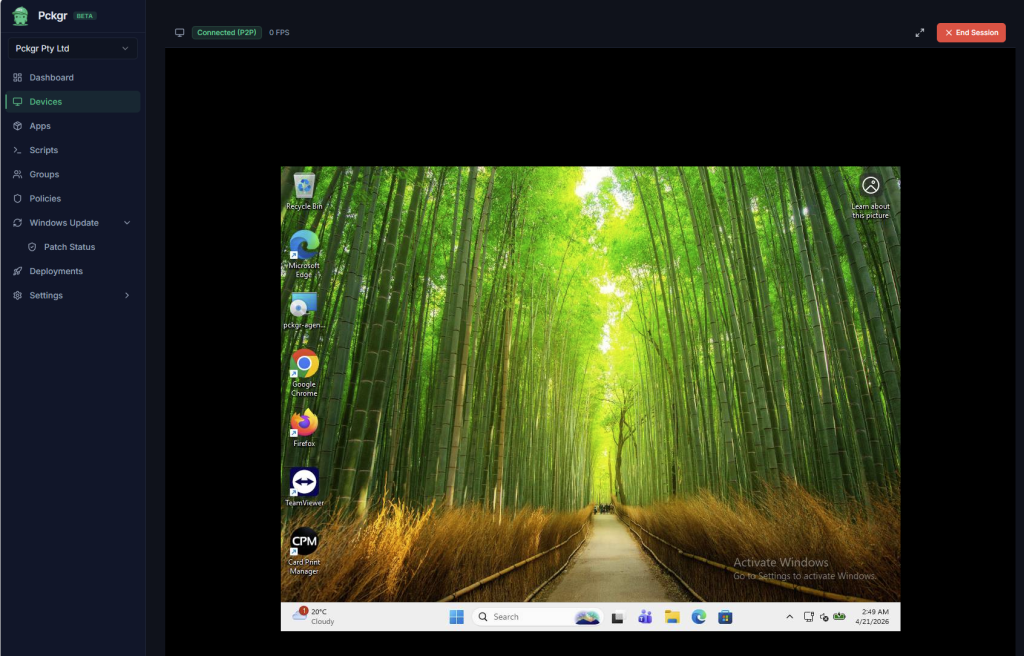
You get remote access even when the device is sitting at the Windows login screen, and multi-monitor setups give you a dropdown to pick which display you’re viewing.
A Self-Service App Store for Your Users
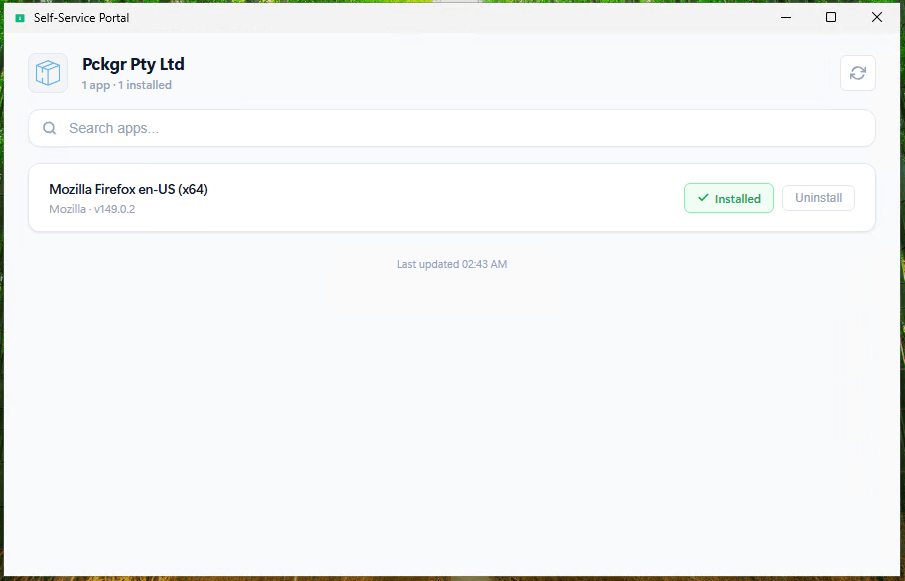
The Pckgr Portal includes a standalone self-service app that runs on the user’s device. Users can browse apps that admins have marked Available, install them on demand, and uninstall when they’re done. It’s fully branded with your company name and logo.
It also stays out of the user’s way. The self-service app never talks to Pckgr directly, it hands every request off to the Pckgr agent already running on the machine. Users never need to log in, never handle credentials, and never see anything they shouldn’t.
If you don’t want self-service, flip a toggle in Settings and it’s gone. Enable it, configure branding, ship the app alongside the agent and you’re done.
Everything Else You’d Expect From a Fleet Management Platform
The Pckgr Portal isn’t just apps, updates, and remote control. The full feature set covers:
- Rule-based groups. Group membership evaluated against device properties like hostname, OS version, agent version, and connection status. Change a rule and the whole tenant re-evaluates immediately. Add a device to a group and it picks up every assignment targeting that group automatically.
- Policy profiles. ADMX-sourced configuration profiles, targeted to groups, with per-device compliance tracking.
- PowerShell scripts. Run ad-hoc or on a schedule. Target specific devices or groups. Full job history per script.
- Device commands. Force check-in, shutdown, restart, or retry a failed rename, individually or in bulk.
- Templates. Capture your apps and policies from a “gold” tenant and stamp them across other tenants in one action. Handy if you run prod, test, and regional environments side by side.
- Immutable audit log. Every admin action written in the same transaction as the action itself. User, action, entity, details, timestamp. Searchable and filterable.
- Deployments board. Every job in the tenant, filterable by status, intent, device, or app. Bulk retry failed jobs, bulk cancel pending ones.
- In-app and email notifications. Configurable per-tenant alert toggles for app updates, enrolments, group changes, user events, and device inactivity.
- SSO via Entra ID. Invite-based user management with Owner, Admin, and Viewer roles.
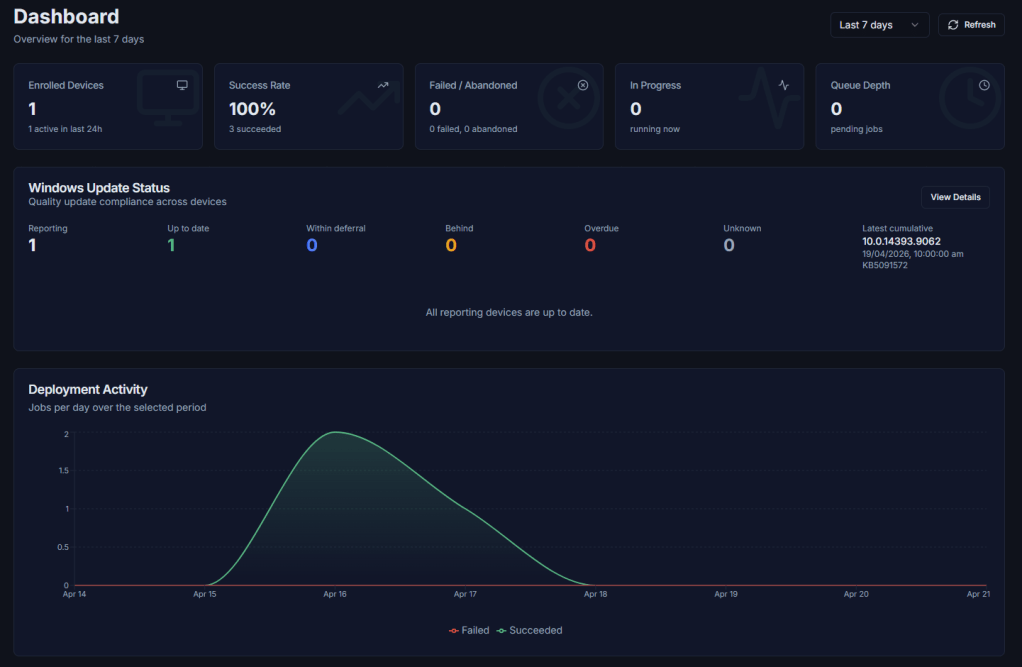
And the dashboard you land on after login pulls it all together: enrolled devices, success rate, in-progress counts, queue depth, update compliance, deployment activity charts, top failing apps, top failing devices, recent activity, performance stats, and idle-fleet alerts. One pane of glass over your whole fleet.
How It Works Under the Hood
Three components. A web portal for you, a cloud service behind it, and a lightweight agent that runs on each managed Windows device. You install the agent with a one-time enrolment token, it registers itself, and it checks in on a regular cadence from then on.
If you run Pckgr across multiple environments (prod, test, regional), every tenant is fully isolated. Your data stays yours, and nothing ever crosses tenant boundaries.
Final Notes
The Pckgr Portal is available today as a public beta. If you’re new to Pckgr, start on the free tier and scale up as you grow. Billing sits at the account level, so seats pool across every tenant you run.
Because we’re in beta, your feedback matters more right now than at any other point in the product’s life. If you spot a bug, hit something that doesn’t work the way you’d expect, or have an idea for a feature we haven’t built yet, please tell us. Every report and suggestion goes straight to our roadmap. That’s how this got built in the first place, and it’s how it’ll get better from here.
Give it a go. We’d love to hear what you think.


Leave a Reply