
We had been running into an issue for months, I knew the fix, but something always seemed more important, until now. If you’re deploying Cursor, or any other Electron app that updates often, this blog may be useful to you.
Here’s the setup. We use Pckgr to manage Cursor updates across our own fleet. Cursor is the AI code editor built on top of VS Code, and it ships new versions constantly, which makes it a perfect candidate for automated patching. Which is exactly what Pckgr is for.
Except it wasn’t working. Not reliably, anyway.
The Issue
After every Cursor update rolled out through Microsoft Intune, the next time we went to open Cursor, we’d get this:
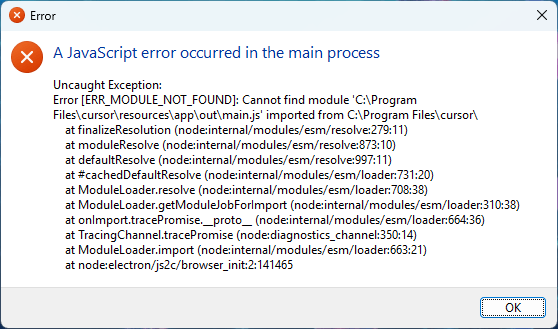
The app was broken. Cursor’s own files were gone, or half gone, and the only way out was a manual reinstall. Which is the exact opposite of what an automated patching platform is supposed to do.
Checking the Intune admin center confirmed what we were seeing on the endpoints:

Why This Happens
Cursor is an Electron app. When you run an installer over the top of an Electron app while it’s still running, you’re asking the installer to overwrite files in C:\Program Files\cursor\ that the running process has open and is halfway through using. Windows does its best to negotiate that, but the end state is often a half-updated install directory. Some files are the new version, some are the old, and some are missing entirely because they were held open and couldn’t be written. The next time you launch Cursor, it tries to load modules from paths that no longer match what’s on disk, and you get the ERR_MODULE_NOT_FOUND above.
This is not a Cursor-specific problem. It will happen with any Electron app, or any app that doesn’t cleanly handle being replaced while it’s running. VS Code gets around it with an in-app updater that quits, swaps, and relaunches itself. Third-party packaging doesn’t have that luxury.
The fix, obviously, is to not update the app while it’s running.
The Fix
Pckgr has a feature called Allow Defer Close Apps. You tell Pckgr which processes to watch for, and if the app is running when the install kicks off, the user gets a prompt asking them to close it. They can defer up to a configurable number of times, after which the install proceeds and closes the app for them.
It’s right there in the advanced installer settings:
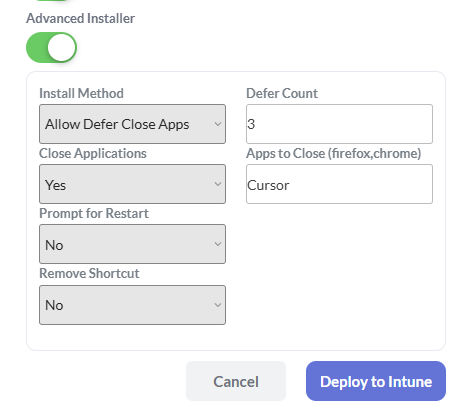
We flipped Advanced Installer on, set Install Method to Allow Defer Close Apps, added Cursor to the Apps to Close list, bumped Defer Count to 3, and redeployed. Next time an update rolled out to a machine with Cursor open, this is what the user saw:
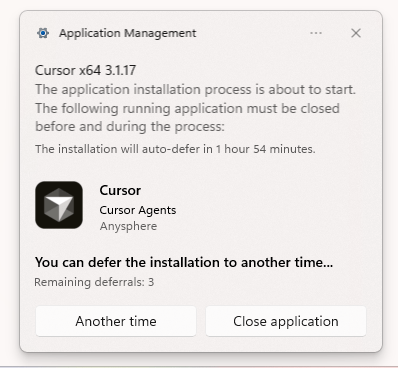
Problem gone. No more broken installs, no more JavaScript module errors, no more manually reinstalling Cursor for everyone on the team who uses it. Should have done this months ago!
What to Do Next
If you’re deploying Cursor, or any other Electron app, through Intune and you’re seeing failed installs after updates, open the package in Pckgr, turn on Advanced Installer, and set the install method to Allow Defer Close Apps with the app’s process name in the list. It takes about thirty seconds, and it will save a lot of support tickets.
 Pckgr Blog
Leave a comment