
Knowing which of your applications are vulnerable is one thing. Patching them across a fleet of devices, before the next CVE drops, is another.
If you’re already running Microsoft Defender for Endpoint (MDE), you know the drill. The vulnerability list tells you that 80 of your devices are running a Chrome version with two critical CVEs. Then you flip into your deployment tool of choice, build a package, push it out, wait, check, retry, and repeat for every other vulnerable app on the list.
We’ve spent the last few months building a feature into Pckgr Portal, our standalone endpoint management platform, to compress that loop. You see the vulnerability, click a button, the patch goes out. Today we’re walking through it end to end.
To set the scene, we’ve installed four apps on a test Windows 11 device, each a few versions behind: VLC media player, 7-Zip, Wireshark, and PuTTY.
VLC and 7-Zip are the kind of tools we’d usually want to keep on the endpoint and bring up to date. Wireshark and PuTTY have no business being there on this particular machine. So we’ll patch the first two and uninstall the second two. Exactly the kind of mixed remediation pile you’d see on a real endpoint.
How the data gets there
When devices check in, the Pckgr agent reports every application installed on the machine. Pckgr maps each detected app to its catalogue entry, which is linked to one or more National Vulnerability Database (NVD) CPE identifiers. The installed version is then checked against published CVE ranges, and anything inside an affected range is flagged.
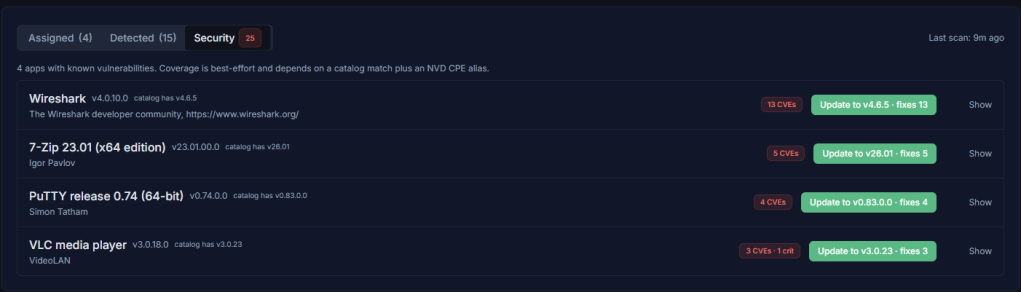
CVE data is pulled from the NVD daily, so a fresh batch of advisories published overnight is picked up the next morning without any action on your side.
The Security overview
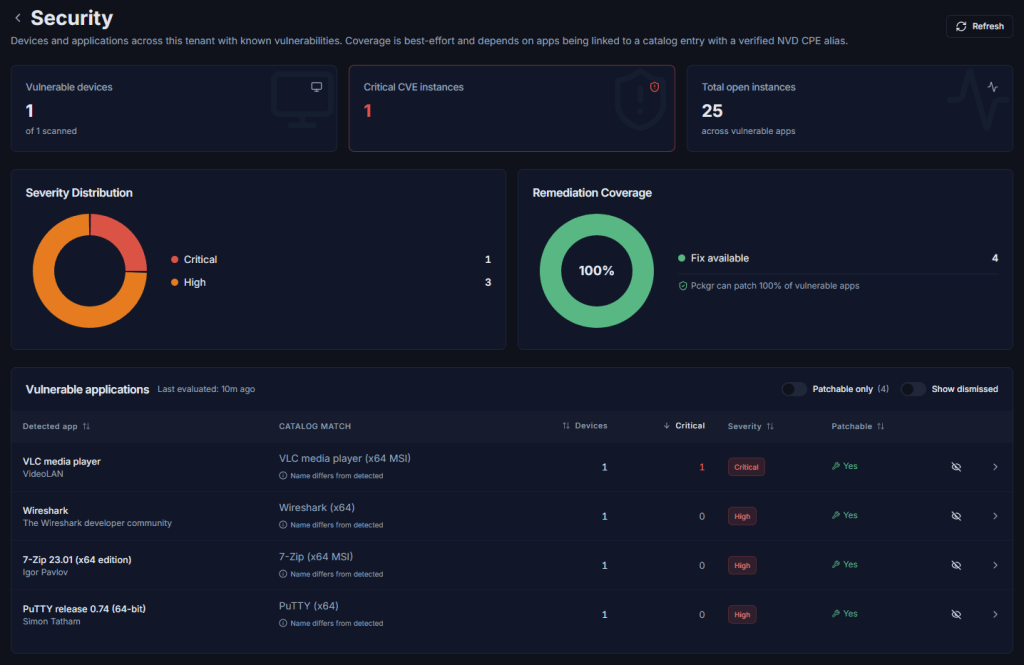
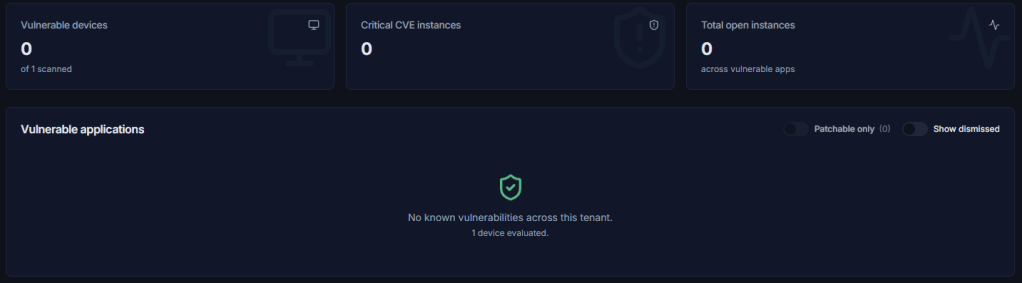
The Security page is a tenant-wide view with three headline metrics at the top:
- Vulnerable devices: how many of your scanned devices have at least one open CVE.
- Critical CVE instances: total count of critical-severity instances across the fleet.
- Total open instances: every open CVE instance summed up.
Below those, a Severity Distribution donut, a Remediation Coverage donut showing the percentage of vulnerable apps Pckgr can patch automatically, and the Vulnerable applications table.
Every app with an open CVE shows up in the table, sortable by device count, critical count, severity, and patchable status. Two toggles let you filter to patchable-only apps or include dismissed false positives.
You’ll notice all four of our test apps show a “Name differs from detected” warning under the catalog match column. That’s expected. The detected app name reported by the agent (e.g. “7-Zip 23.01 (x64 edition)”) doesn’t have to exactly match the catalogue name (e.g. “7-Zip (x64 MSI)”), and Pckgr flags it so you can check the match. If the auto-match has picked the wrong entry, click the catalog match column to open the picker. Pckgr shows ranked candidates by name, publisher, and architecture, and changing the match remaps every detected install of that app across your tenant.
Drilling into a vulnerable app
Click any row in the table to open the app detail page. We’ll work through VLC first since it’s carrying the only critical CVE in our demo.
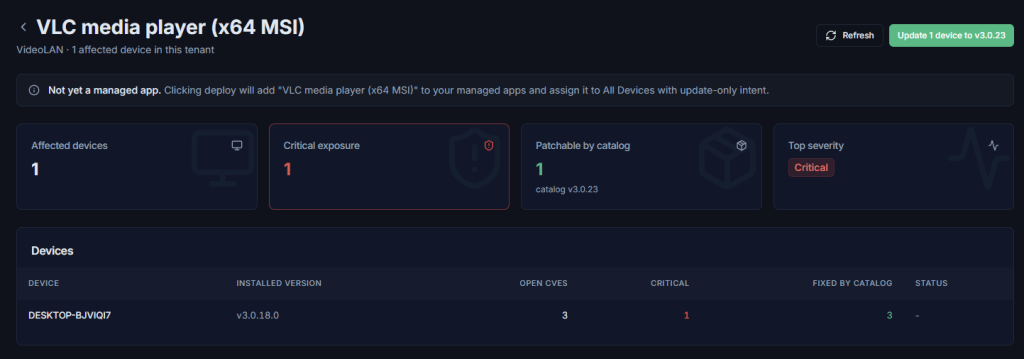
Four tiles at the top: Affected devices, Critical exposure, Patchable by catalog, and Top severity. The devices table beneath shows every affected machine, its installed version, open and critical CVE counts, how many of those CVEs the catalogue’s latest version fixes, and whether a job is already in flight.
Per-device CVE detail
Open any device’s detail page and you’ll find a Security tab listing every catalogue-linked app on that machine with at least one open CVE.
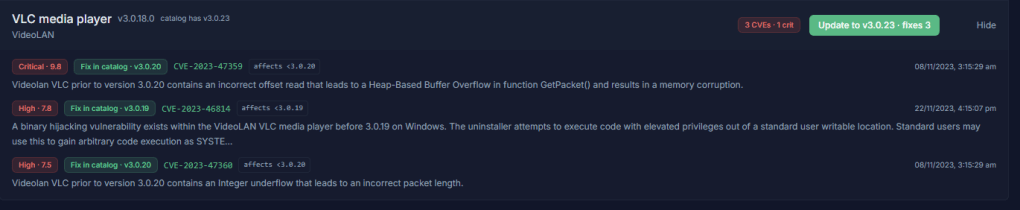
Each card expands to show individual CVEs with severity score, fix status, affected version range, and a link to the NVD entry for the full advisory. When a fix is available in the catalogue, the green “Update to Version” button at the top of the card queues the patch for that device.
Two ways to action this
Now we get to the actual remediation. With our four apps, we’d take two different paths.
Path 1: Patch VLC and 7-Zip in place. These are legitimate productivity tools we want to keep on the endpoint. They just need to be on a current version. On each app’s detail page, the “Update N devices” button at the top queues an update job for every patchable device in scope. Devices with an in-flight job are skipped automatically, so you can re-run the action without worrying about double-deploying.
If the app isn’t already a managed app in your tenant (which is likely if you’ve only just spotted it as vulnerable), Pckgr adds it for you, assigns it to All Devices with update-only intent, and queues the job. No packaging, no uploading, no manual assignment.

Path 2: Uninstall Wireshark and PuTTY. Neither belongs on a standard end-user endpoint. Rather than chase them with patches every time a new CVE drops, the cleaner move is to remove them entirely.

[SCREENSHOT: A row in the Detected apps tab showing one of the unwanted apps with the CVE pill next to its version and an Uninstall button on the right] The CVE pill surfaces in the Detected apps tab as well, so unwanted vulnerable installs are easy to spot while triaging.
Head to the Detected tab on the device and find the offending app. Any detected app with open CVEs gets a CVE pill next to its version, so you can spot risk at a glance without leaving the device view. The Uninstall button is right there in the row.

Coverage and limitations
A few things worth knowing before you rely on this for compliance reporting:
- Coverage depends on detected apps being matched to a catalogue entry with a verified NVD CPE alias. Apps without a catalogue link won’t be tracked.
- Version comparison is best-effort for non-standard version schemes. Anything ambiguous is treated conservatively, so we’d rather under-flag than send you chasing a CVE that doesn’t actually apply to your installed version.
- The feature currently covers Windows desktop applications. Mobile and browser-extension CVEs are filtered out.
Try it
Vulnerability tracking is live now for every Pckgr Portal tenant in beta. If you’ve already got the agent on a few devices, head to the Security tab and the rollup will populate within a few hours of the next check-in.
If you haven’t tried Pckgr Portal yet, head over to portal.pckgr.com for a free trial.


Leave a comment