
Lately at Pckgr, we have noticed something across the app catalogues we look after. More and more software vendors are quietly shifting their installers from the familiar .msi and .exe over to .msix, and most of them hand you the new package with no migration guidance at all. No notes on what changed, no explanation of why, just a different file extension where the old one used to be.
That sent us digging. If vendors are moving this way, we wanted to properly understand what the format actually is and how to best support these applications in Pckgr.
The short version is that appx and msix are not separate technologies. They are two ideas combined in two ways. Once you see the pattern, the whole thing stops being confusing. Let us break it down properly.
Underneath, they are all the same kind of file
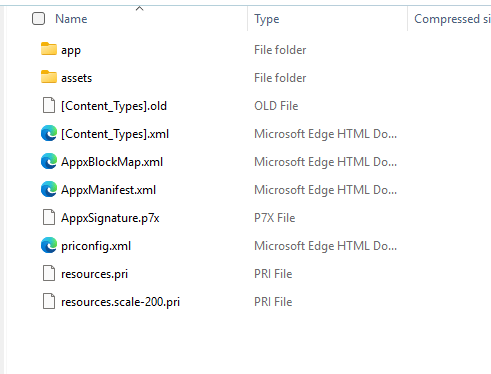
Every one of these is a signed, zipped container with a manifest inside. Rename a .msix to .zip, open it, and you will find the app files, the icons and assets, a manifest describing the app, and the signature proving where it came from. The install process behind them is shared too, so Windows barely cares which of the four extensions it is handed. The only real differences are how modern the format is, and whether it holds one package or several.

Appx versus msix: legacy versus modern
Appx came first, with Windows 8 in 2012, as the format for Windows Store apps (the sandboxed apps that later became the Universal Windows Platform, or UWP). It still works, but it is the legacy option now.
Msix is the modern replacement, introduced in 2018. Microsoft basically renamed and extended appx. Same zipped, signed, manifest structure underneath, but it handles far more, including normal desktop apps and not just Store ones. It also installs and uninstalls more cleanly and updates more efficiently.
Both formats are built for a single processor architecture. One package targets x64, another x86, another ARM. This is where the bundles come in to solve that problem by including multiple architectures within one package.
So why move away from msi and exe?
This is the part we actually wanted to understand. The .msi and .exe installers we have all used for decades still work, but they carry a few old problems, and msix was built to fix them.
An .exe can do anything during setup. It runs whatever code it likes, drops files wherever it wants, and writes what it wants to the registry. Handy for developers, but it means every installer is different, which is why you end up hunting for each app’s silent install switches just to push it out quietly. It also leaves a mess. Files and registry keys get scattered across the system, and uninstalls often fail to clean all of it up, which is a big part of why machines feel slower the longer they have been running. And because the installer runs with full rights, one badly behaved app can affect everything else.
Msix takes the opposite approach. It is a standard format, so there are no silent switches to chase and the install details come straight from the manifest. It runs in a container that keeps the app’s file and registry writes in its own space, so it cannot scribble over the system. Windows tracks exactly what it installed, so the uninstall is clean. And updates only pull down the parts that actually changed.
None of this means msi and exe are dead. Windows still fully supports them and plenty of software still ships that way. Microsoft is not forcing the switch, just nudging towards msix as the cleaner option. Which is why you will be dealing with all of these side by side for a good while yet.
Single package versus bundle
Now the other two. A single .appx or .msix only covers one architecture, which is a headache if your fleet is a mix of x64 and ARM.
A bundle fixes that. An .appxbundle or .msixbundle is just a wrapper holding several single packages, one per architecture, plus any language or display scale extras. Windows opens the bundle, picks the package that matches the machine, and installs only that one. So the full picture is a simple grid:
| Single package | Bundle | |
|---|---|---|
| Legacy | .appx | .appxbundle |
| Modern | .msix | .msixbundle |
What we are watching at Pckgr
The reason this matters beyond trivia is that the switch from msi or exe to msix is rarely clean. Because they are different install technologies, an msix does not always replace the old install the way a newer msi would replace an older one. A lot of the time the msix lands alongside the existing version, and you are left with the app installed twice until something removes the old one. How that plays out depends entirely on the vendor. Some uninstall the old version as part of the move, some leave it sitting there, and some expect you to clear it out first.
That is what we are keeping a close eye on at Pckgr. We are tracking which vendors are moving their apps across to msix, and just as importantly, how each one behaves when it updates from the old architecture to the new package. Does it upgrade in place, or double up? Does it carry the old settings across, or start fresh? Knowing that before it reaches your fleet is the difference between a quiet rollout and a round of duplicate-app tickets.


Leave a Reply