
If you manage a fleet of Macs through Microsoft Intune, keeping third party apps installed and up to date is one of the more awkward corners of the job. Intune has no native third party app patching for macOS, so it usually comes down to scripting things yourself. Windows admins have built up plenty of awesome ways to patch applications via Intune. On the Mac side the toolbox is thinner.
Since we added macOS support, Pckgr has handled Mac app deployments using Installomator, and it has served admins well. We are now adding a second method to cater for enterprise level customers: prepackaged private apps that we build and upload straight into your tenant. Both deploy from Pckgr, and both land in Microsoft Intune, so the real question is not Pckgr versus anything. It is which delivery method makes more sense for your environment. Let us look at how each one works, then put them side by side.
How we deploy Mac apps today: Installomator scripts
Installomator is an open source script maintained by the Mac admins community, and normally you would run it as a standalone tool. It is also what Pckgr has used to deploy Mac apps from the start. When you deploy a macOS app through our Installomator Repository, we take the relevant Installomator script, bundle it, and push it to your tenant as an Intune shell script.
When a Mac runs that script, Installomator reaches out to the vendor’s official download source, pulls the current version of the app, verifies it, and installs it. Because it fetches at install time, you are always getting the latest release. That community backing is a real strength too. There are labels for hundreds of applications, and if a vendor changes a download URL there is usually a fix in the repository within days.
Running as a script on the device also brings a couple of things a prepackaged app cannot match today:
- User notifications through swiftDialog. Installomator can hand off to swiftDialog to show clean, native looking prompts and progress dialogs, so users are not left wondering why an app just appeared or a reboot is pending.
- Update Only behaviour. Installomator can be told to check for the app path first and only proceed if the application is already installed. That means you can push updates to machines that already have the app, without installing it fresh on everyone. It is a useful pattern for patching without expanding your footprint.
The new option: prepackaged private apps
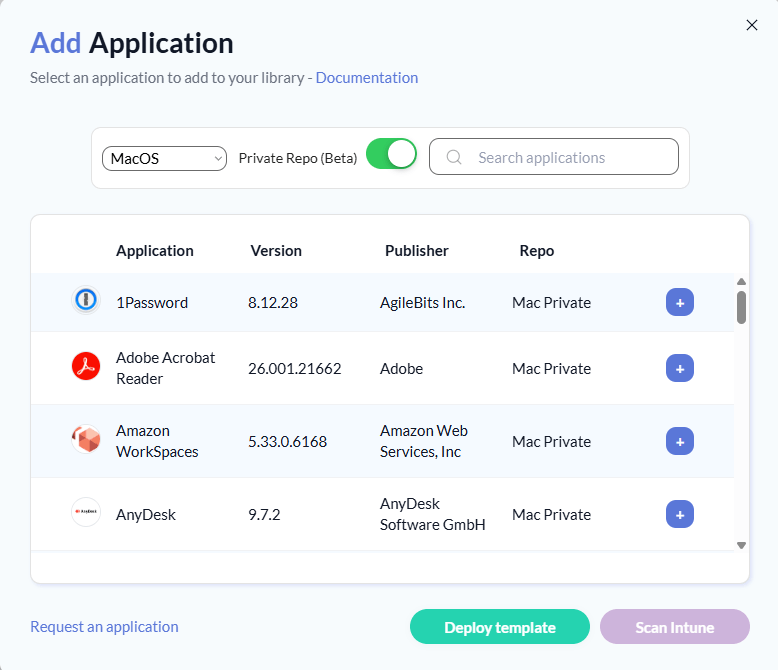
The second method flips the model around. Instead of shipping a script that downloads the app later, we package the application ahead of time in our own private workflows and upload the actual app into your tenant as a native macOS app. This is the Private Mac Repository.
The important difference is what happens on the device. With a prepackaged app there are no external calls at install time. The Mac does not need to reach GitHub to pull down Installomator or swiftDialog, and it does not need to reach the vendor’s servers to grab an installer. Everything is bundled into the deployment before it lands in your tenant, so the device simply checks in with Intune, receives the app, and installs it.
That has a real impact on reliability. Every external dependency is a thing that can break: a GitHub outage, a vendor moving a download link, a proxy blocking an unexpected domain, a firewall rule that was fine last week. With a prepackaged app, all of that happens once, on our side, before the app ever lands in your tenant. What reaches your devices is a self contained package that only talks back to Intune.
There is a trade off, and it is worth being honest about it. Because the app is a fixed package rather than a live script, the Private Mac Repository does not support Update Only deployments, a limitation that comes from Intune itself rather than from Pckgr. Instead, we monitor supported apps for new releases, rebuild and validate the package, and republish the new version to Intune, which then rolls it out on the next check in.
Note: The Private Mac Repository is available on the Pckgr Business plan.
Side by side
| Installomator Repository | Private Mac Repository | |
|---|---|---|
| How Pckgr delivers the app | Bundled Installomator script, deployed as an Intune shell script | Prepackaged app, uploaded to Intune as a native macOS app |
| Where the app comes from at install | Fetched from the vendor when the script runs | Already bundled in the deployment |
| External dependencies on the device | GitHub (for Installomator and swiftDialog) plus the vendor’s download servers | None. The device only talks to Intune |
| How it appears in Intune | Shell script under Devices > macOS > Shell scripts | Native macOS app under macOS apps |
| User notifications | Yes, via swiftDialog | Not currently |
| Update Only (patch existing installs) | Yes | No, due to an Intune restriction |
| Keeping apps current | Fetches the latest version on each run | Pckgr rebuilds and republishes new releases |
| Plan | Included on Pro plan and up | Pckgr Business plan |
So which should you use?
Neither method is simply better than the other, and plenty of environments will end up using both.
The Installomator Repository is a strong fit when you want the flexibility of the community label set, you rely on swiftDialog prompts to keep users informed, or you specifically want Update Only behaviour to patch machines that already have an app. If your devices have reliable access to GitHub and vendor download sources, it is a proven way to keep Macs current.
The Private Mac Repository makes sense when you want to remove external dependencies from the equation entirely. In tightly controlled networks, in environments where GitHub access is restricted, or anywhere you would rather not have devices reaching out to a spread of vendor URLs, a self contained package that only speaks to Intune is a lot easier to reason about and support.


Leave a Reply